Topic clusters and pillar pages are a way to organize your website content around one big subject. A pillar page covers the main topic in full. A group of smaller articles, called the cluster, covers each subtopic in more detail. Every page links to the others, so search engines and AI tools can clearly see that you know the topic well.
If your blog feels like a pile of random posts, this guide is for you. You will learn what topic clusters and pillar pages are, why they help with SEO, AEO, and GEO, and how to build your own, step by step, with simple examples.
Key Takeaways
- A pillar page is one long, complete guide on a broad topic.
- A topic cluster is a group of related articles that each go deep on one subtopic.
- The pillar links to every cluster page, and every cluster page links back to the pillar.
- This setup builds topical authority, which helps your pages rank and helps AI tools trust and cite you.
- You do not need hundreds of posts. A pillar and five to ten good cluster pages is a strong start.
What Is a Topic Cluster?
A topic cluster is a group of web pages that all cover one main subject from different angles. One page covers the big picture. The other pages each answer a smaller question about that subject.
You may also hear it called a content cluster, cluster content, or content hub. They all mean the same thing: related content, grouped together and linked together on purpose.
The idea became popular after HubSpot started using it in its own content strategy, and many SEO teams use it today. It works because search has changed. Google no longer looks only at single pages and single keywords. It tries to understand whether your whole site is a trusted source on a subject.
What Is a Pillar Page?
A pillar page is the main page of a topic cluster. It gives a broad overview of a topic and touches on every important subtopic. It does not try to explain everything in full detail. Instead, it points readers to the cluster pages that do.
Think of a pillar page like the table of contents and summary chapter of a book. It tells you what the book covers, gives you the basics of each chapter, and tells you where to turn for more.
A good pillar page is:
- Broad: it covers a main topic, such as “technical SEO” or “teeth whitening,” not a tiny question.
- Complete: a reader should come away with a solid understanding of the topic.
- Well organized: clear headings, a table of contents, and short sections.
- Connected: it links out to each cluster page.
Pillar content is often written to target a broad keyword with high search volume. Cluster pages usually target longer, more specific keywords that are easier to rank for.
How Do Topic Clusters and Pillar Pages Work Together?
They work as a hub and spoke model. The pillar page is the hub. The cluster pages are the spokes. Here is a simple picture of it:
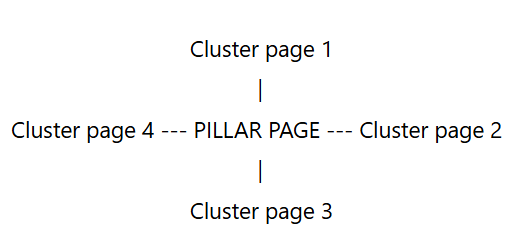
The links go both ways:
- The pillar page links to each cluster page, usually with a short summary of that subtopic.
- Each cluster page links back to the pillar page.
- Cluster pages that are closely related also link to each other.
This creates a tight web of links. A reader who lands on any page can easily find the rest of your content on that topic. A search engine crawler can do the same.
Pillar Page vs Cluster Page: Quick Comparison
| Pillar Page | Cluster Page | |
| Topic size | Broad | Specific |
| Example title | Technical SEO: The Complete Guide | What Is a Canonical Tag? |
| Depth | Overview of everything | Deep dive on one subtopic |
| Typical keyword | Short, high volume | Long-tail, lower competition |
| Typical length | Long (often 2,000 to 4,000 words) | Medium (often 1,000 to 2,000 words) |
| Links | Links to all cluster pages | Links to the pillar and to related cluster pages |
| Reader’s goal | “I want to understand this topic” | “I need the answer to this one question” |
Why Do Topic Clusters and Pillar Pages Matter for SEO?
Here are the main reasons this structure helps your rankings.
1. They build topical authority
Topical authority means a search engine sees your site as a trusted expert on a subject. When you publish one article on a topic, you are a guest. When you publish a pillar and ten strong articles on that topic, all linked together, you start to look like a real authority.
2. They improve internal linking
Internal links help Google find your pages and understand how they relate. They also pass authority from one page to another. A cluster gives you a natural, logical reason to link your pages together, instead of adding random links here and there. If you want a deeper look at this, read our guide on internal linking and how to structure links for better rankings.
3. They help you avoid keyword cannibalization
When you plan your content in clusters, each page has its own job and its own keyword. The pillar targets the broad term. Each cluster page targets one specific question. This stops your own pages from competing against each other.
4. They make your site easier to use
Readers do not want to hunt for answers. If someone finishes a cluster page and wants more, the pillar and the related pages are one click away. People stay longer and read more.
5. They make updates easier
When something changes in your industry, you know exactly which pages to update. You can fix the pillar and the affected cluster pages without searching through your whole blog.
Do Topic Clusters Help With AEO and GEO?
Yes, and this is where they have become even more useful. People now get answers from AI Overviews, ChatGPT, Perplexity, and Gemini, not only from the ten blue links.
Answer engine optimization (AEO) is about giving clear, direct answers that search engines and AI assistants can pull out and show. If you want to learn the basics, read What Is AEO (Answer Engine Optimization)?
Generative engine optimization (GEO) is about making your content easy for AI models to understand, trust, and cite.
Topic clusters help with both:
- Clear coverage of a topic. AI tools look for sources that cover a subject fully and consistently. A cluster shows that you do.
- Easy-to-extract answers. Cluster pages answer one question each. That makes it simple for an AI tool to find the exact answer and quote it.
- Clear relationships between ideas. Your internal links and headings show how concepts connect, which helps machines understand your content.
- Consistent terms and definitions. When every page in the cluster uses the same names for the same things, there is less confusion and more trust.
In short, a cluster is a very machine-friendly way to organize what a human expert already knows.
Topic Cluster Examples
Examples make this much easier to understand. Here are two.
Example 1: An SEO Website
Pillar page: On-Page SEO: The Complete Guide
Cluster pages:
- Title Tags 101: How to Write Them for Clicks and Rankings
- What Are Header Tags (H1-H6) and How to Use Them for SEO
- How to Write Meta Descriptions That Actually Get Clicks
- How to Optimize Images for SEO (Alt Text, File Names, Compression)
- Internal Linking: How to Structure Links for Better Rankings
Each cluster page answers one question in detail. The pillar page gives the full overview of on-page SEO, and links to all five.
You could build a second cluster in the same way. For example, a pillar called Technical SEO: The Complete Guide could link to articles on robots.txt, sitemaps, canonical tags, crawl budget, and duplicate content.
Example 2: A Local Dental Clinic
Pillar page: Teeth Whitening: Everything You Need to Know
Cluster pages:
- How Much Does Teeth Whitening Cost?
- At-Home Whitening vs Professional Whitening
- Does Teeth Whitening Hurt?
- How Long Do Whitening Results Last?
- Who Should Not Whiten Their Teeth?
A person searching “how much does teeth whitening cost” lands on a cluster page and gets a direct answer. Right below it, they see a link to the full whitening guide and the booking page. The clinic gets a lead, and Google sees the clinic as an expert on teeth whitening.
How to Build Topic Clusters and Pillar Pages: Step by Step
Follow these seven steps.
Step 1: Choose a Core Topic
Pick a broad subject that matters to your business and that you can talk about with real knowledge. Good pillar topics are:
- Closely tied to what you sell or offer
- Broad enough to have at least five to ten subtopics
- Something your audience searches for again and again
A good test: can you complete the sentence “We help people with ___”? That blank is often your pillar topic.
Step 2: Research Keywords and Questions
Start with one broad keyword for the pillar. Then find the related questions people ask. Useful sources are:
- Google autocomplete and the “People also ask” box
- Google Search Console, which shows the queries you already get impressions for
- Keyword tools such as Ahrefs, Semrush, or Ubersuggest
- Your own customers. The questions they ask you on calls and emails are gold.
Write everything in a simple list. Do not worry about order yet.
Step 3: Group Keywords by Search Intent
Search intent is the reason behind a search. Someone searching “what is a canonical tag” wants to learn. Someone searching “SEO agency near me” wants to hire. Group your keywords by intent, and give each group its own page.
If two keywords have the same intent, they belong on the same page. If they have different intent, they need different pages. This is the best way to avoid keyword cannibalization.
Step 4: Map Out Your Cluster Pages
Turn your groups into a content plan. A simple spreadsheet works well, with these columns:
- Page type (pillar or cluster)
- Page title
- Target keyword
- Search intent
- URL
- Status (planned, written, published)
- Pages it should link to
For a first cluster, aim for one pillar and five to ten cluster pages. You can always add more later.
Step 5: Write the Cluster Pages First
Most people write the pillar first. Many SEOs find it easier to write the cluster pages first, because you then know exactly what to summarize in the pillar. Either order works. Just make sure every cluster page:
- Answers its main question in the first two or three sentences
- Goes deep, with examples, steps, or screenshots
- Uses clear headings, ideally written as questions
- Links back to the pillar page
- Links to one or two closely related cluster pages
Step 6: Write the Pillar Page
Now write the pillar. A strong pillar page has this structure:
- A short, clear definition of the topic at the top
- A table of contents so readers can jump to what they need
- One section per subtopic, each with a short summary and a link to the full cluster page
- Examples, visuals, or simple checklists to make it practical
- An FAQ section that answers common questions in plain language
- A clear next step, such as a related guide or a contact link
Keep the language simple. A pillar page is long, but it should never feel heavy.
Step 7: Link Everything Together
This is the step that turns a group of pages into a real cluster. Check that:
- The pillar links to every cluster page.
- Every cluster page links to the pillar.
- Related cluster pages link to each other where it makes sense.
- You use natural, descriptive anchor text, like “how to write a title tag,” instead of “click here.”
Best Practices for Pillar Pages and Cluster Content
- Match search intent. Look at what is already ranking and give people the kind of page they expect.
- Answer first, explain later. Put a short, direct answer at the top of each section. This helps both readers and AI tools.
- Use clear headings. Use one H1, and H2 and H3 headings that describe each section. Question-style headings work very well for answer engines.
- Keep your URL structure tidy. Short, readable URLs are best, for example /blog/topic-clusters-and-pillar-pages/.
- Add real examples. Examples show experience, and experience builds trust.
- Show who wrote it. Add an author name and a short bio so readers and search engines know there is a real person behind the content.
- Add schema markup. Article schema and FAQ schema help machines understand your pages.
- Keep it fresh. Review your pillar and cluster pages every few months and update anything outdated.
Common Mistakes to Avoid
1. Making the pillar page too thin. A pillar page that is only a short list of links will not rank. It needs real, useful content on its own.
2. Making the pillar page too narrow. If your pillar topic is too specific, you will run out of subtopics fast. Go broader.
3. Writing cluster pages that are almost the same. If two pages answer the same question, merge them. This is the classic cause of keyword cannibalization.
4. Forgetting the links. Great content with no internal links is just a group of lonely pages. The links are what make it a cluster.
5. Using vague anchor text. Phrases like “read more” and “click here” tell Google nothing. Use descriptive words.
6. Publishing and forgetting. Topics change. Old stats, old tools, and old advice hurt your trust. Update the cluster regularly.
7. Starting too big. Do not try to build ten clusters at once. Finish one good cluster, learn what works, then repeat.
Can You Turn Your Existing Blog Into Topic Clusters?
Yes, and it is often the fastest way to see results. You do not always need to write everything from scratch. Here is a simple way to do it:
- List all your current blog posts in a spreadsheet.
- Group them by topic. You will often find that you already have three to eight posts on the same subject.
- Pick or create a pillar page for each group.
- Add internal links from the pillar to each post, and from each post back to the pillar.
- Fill the gaps. Write new cluster pages for important questions you have not answered yet.
- Merge or redirect weak, overlapping posts into stronger ones.
Many sites see their rankings improve after this kind of clean-up, because their content finally works as a team instead of as separate pieces.
How to Measure Whether Your Clusters Are Working
Give new content a few months before you judge it. Then check these things:
- Impressions and clicks for the cluster as a whole. In Google Search Console, filter by the URL folder or by a group of pages to see the total.
- Rankings for the pillar keyword and cluster keywords. Look for steady upward movement.
- Internal clicks. In Google Analytics, check whether readers move from cluster pages to the pillar page and to other pages.
- Time on page and pages per session. Better structure usually means people read more.
- Mentions in AI answers. Search your main questions in ChatGPT, Perplexity, and Google AI Overviews and see whether your pages are being cited. If you want to do this properly, follow our guide on how to check if your website is being cited in ChatGPT and Google AI Overviews.
Topic Cluster Checklist
Use this quick checklist before you publish:
- I have chosen a broad core topic that fits my business
- I have researched keywords and real customer questions
- I have grouped keywords by search intent
- Each page targets its own keyword, with no overlap
- I have a pillar page and at least five cluster pages planned
- Every cluster page answers its main question early
- The pillar page links to every cluster page
- Every cluster page links back to the pillar page
- Related cluster pages link to each other
- Anchor text is clear and descriptive
- Each page has an author, a date, and schema markup
- I have a plan to review and update the cluster every few months
Frequently Asked Questions
What is the difference between a topic cluster and a pillar page?
A pillar page is one long page that gives a complete overview of a broad topic. A topic cluster is the whole group of pages, which includes the pillar page and all the smaller articles that cover its subtopics. The pillar is the center, and the cluster is the full set.
How many cluster pages do I need for one pillar page?
There is no fixed number. Most sites start with five to ten cluster pages per pillar. What matters is that you cover the important subtopics and questions that your audience actually has, not that you hit a certain count.
How long should a pillar page be?
A pillar page is usually between 2,000 and 4,000 words, but length should come from usefulness, not padding. Cover the topic fully, keep each section tight, and send readers to cluster pages for the details.
Do topic clusters help with AI search and AEO?
Yes. Topic clusters show that your site covers a subject completely and consistently. Cluster pages that answer one clear question each are easy for AI tools like ChatGPT, Perplexity, and Google AI Overviews to understand and quote.
Can I have more than one pillar page on my website?
Yes. Most websites have several. A site might have one pillar page for each main service or each main area of expertise, with its own cluster pages around each one.
Are topic clusters the same as content silos?
They are related but not identical. A silo usually groups pages under the same URL folder. A topic cluster focuses on how pages are linked and how the topic is covered. The two ideas work well together, and you can use both.
How long does it take to see results from topic clusters?
It depends on your site and your competition. Many sites start to see movement in a few months, and stronger results over six to twelve months as more cluster pages are published and indexed. Keep adding and improving content, and the results build over time.
How often should I update my pillar page?
Review it at least every three to six months. Update outdated facts, add links to any new cluster pages, and improve sections that are not performing well.
Final Thoughts
Topic clusters and pillar pages are not a trick. They are simply a clear and honest way to organize what you know. You pick a topic, cover it fully, break it into useful pieces, and connect those pieces so people and machines can find their way around.
Start small. Choose one core topic, plan five to ten cluster pages, write a strong pillar, and link everything together. Then watch how your rankings, your traffic, and your AI visibility improve as your authority on that topic grows. If you would like expert help building a content structure that works for both search engines and AI search, take a look at the AI SEO services from BizClick Digital.